
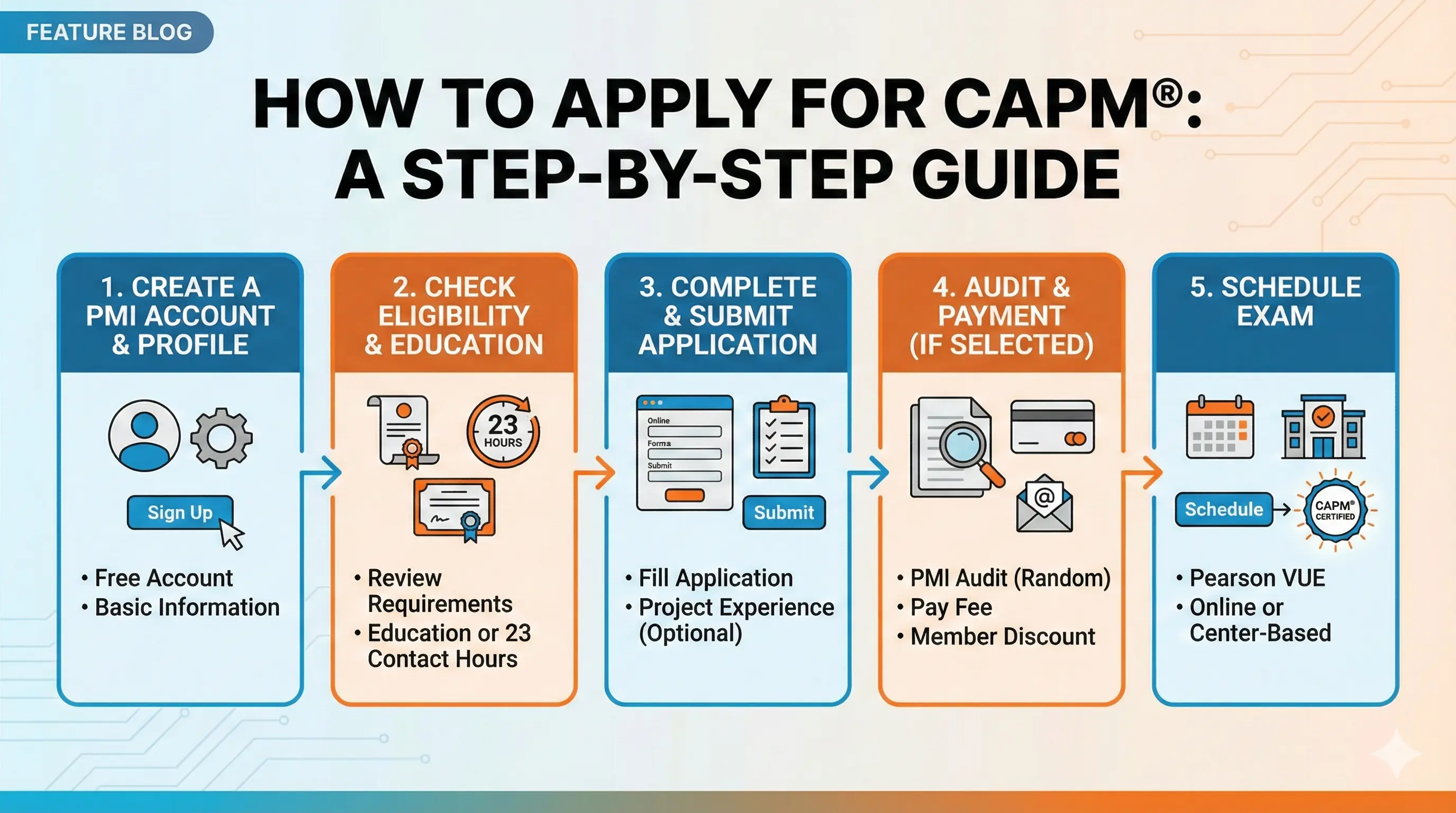
The CAPM application process is straightforward when you know what to expect. Most candidates complete it in 30-45 minutes if they have their documentation ready. No complicated essays, no supervisor verification, no lengthy waiting periods—just a systematic process that gets you from "interested" to "scheduled" efficiently.
This guide walks you through every step, from creating your PMI account to scheduling your exam date. For a complete overview of the certification, see our CAPM Certification Guide.
Before You Apply: Your Checklist
Gather everything you need before starting the application. This prevents frustration from hunting for information mid-process.
Confirm your eligibility:
- Secondary degree (high school diploma, associate's, or global equivalent)
- 23 hours of project management education completed
If you're unsure whether you meet these requirements, review our detailed guide on CAPM Requirements before proceeding.
Gather your documentation:
- Details of your secondary education (school name, degree type, completion date)
- PM education records: course titles, provider names, dates completed, hours for each
- You don't need to upload documents during the application, but have the information accessible
Decide on PMI membership:
- Member exam fee: $225
- Non-member exam fee: $300
- Membership cost: $149/year (first year includes $10 application fee)
If you're joining PMI, do it before starting your exam application to get the member rate. See our CAPM Cost breakdown to decide if membership makes sense for you.
Have payment ready:
- Credit card or other accepted payment method
- Full exam fee due at submission ($225 or $300)
Step 1: Create Your PMI Account
If you don't already have a PMI account, you'll need to create one. This account is separate from PMI membership—anyone can create a free account.
To create your account:
- Go to PMI.org
- Click "Log In" in the top right corner
- Select "Create Account"
- Enter your email address and create a password
- Complete your basic profile information (name, country, etc.)
- Verify your email address
Profile tips:
- Use your legal name exactly as it appears on your government-issued ID—this must match for exam check-in
- Choose a password you'll remember; you'll need this account throughout your certification journey
- Add your mailing address accurately if you want physical certificate delivery
If you're joining PMI:
After creating your account, navigate to "Membership" and complete the membership application before starting your exam application. Membership activates immediately after payment, so you can proceed to the exam application right away with your member discount applied.
Step 2: Start the CAPM Application
With your account created (and membership active, if applicable), you're ready to begin.
To start your application:
- Log into your PMI account
- Navigate to "Certifications" in the main menu
- Find CAPM and select "Apply Now"
- Review the eligibility requirements and confirm you qualify
- Begin the application form
Good to know:
- The application auto-saves as you go
- You can leave and return later—your progress won't be lost
- The application remains open for 90 days if you need to gather additional information
Step 3: Enter Your Educational Background
The first major section asks about your secondary education. This establishes that you meet the basic eligibility requirement.
Information you'll provide:
- Country where you completed your education
- Institution name (your high school, college, or equivalent)
- Level of education (secondary, associate's, bachelor's, etc.)
- Field of study (if applicable—any field qualifies)
- Start and end dates (approximate is fine)
Tips for this section:
- If you have multiple degrees, you only need to list one that meets the requirement
- International education is accepted—choose the equivalent level from the dropdown options
- You don't need to provide transcripts unless audited later
- If your school has changed names, use the name it had when you attended
Step 4: Document Your PM Education Hours
This section is the most detailed part of the application. You'll enter information about the courses that comprise your 23 hours of project management education.
For each course, you'll provide:
- Course title
- Provider/institution name
- Start and end dates
- Number of contact hours
- General description of content covered
Example entry:
- Course Title: "CAPM Exam Prep Course"
- Provider: "Udemy - Joseph Phillips"
- Dates: January 2025
- Hours: 25
- Description: "Comprehensive CAPM preparation covering project management fundamentals, predictive and agile methodologies, and business analysis concepts"
You can list multiple courses:
Your 23 hours don't need to come from a single source. If you completed a 15-hour course and an 8-hour workshop, list both. PMI totals them automatically.
Documentation tips:
- Be accurate with hours—don't round up or estimate generously
- Course titles should match your certificates in case of audit
- Provider names should be specific (company or institution, not just "online course")
- Descriptions don't need to be lengthy—a sentence or two covering the PM topics is sufficient
What if you're short on hours?
If you haven't completed your 23 hours yet, don't submit the application. Finish your education first—you're attesting that you've already completed this requirement when you submit.
Step 5: Review, Pay, and Submit
Before finalizing, you'll review everything you've entered. Take a few minutes to verify accuracy.
Review checklist:
- Name matches your government ID exactly
- Education information is accurate
- PM education hours total at least 23
- Contact information is current
Payment:
- Select your payment method
- Confirm the amount ($225 for members, $300 for non-members)
- Complete the transaction
Submission:
- Agree to PMI's certification policies and code of ethics
- Submit your application
- Save or print your confirmation for your records
Once submitted, your application enters PMI's review queue. You'll receive email confirmation immediately, with eligibility notification to follow.
After You Submit: What Happens Next
PMI reviews applications to verify completeness and may randomly select some for audit. Here's what to expect.
Standard review timeline:
- Most applications are reviewed within 5-10 business days
- You'll receive an email notification when a decision is made
- If approved, you'll gain access to schedule your exam
If you're selected for audit:
A percentage of applications are randomly audited. If this happens:
- You'll receive instructions for submitting documentation
- You have 90 days to provide proof of your education and PM training
- Required documents: copy of diploma/transcript, copies of training certificates
- PMI reviews documentation and notifies you of the result
- The audit process typically adds 2-4 weeks to your timeline
Don't panic if you're audited—it's routine quality assurance, not an indication of problems with your application. As long as your information was accurate, you'll pass the audit.
Your eligibility window:
Once approved, you have one year to pass the exam. This window includes up to three exam attempts if needed. If the year expires without passing, you'd need to reapply and pay the application fee again.
Scheduling Your Exam
With an approved application, you can schedule your exam through Pearson VUE, PMI's testing partner.
To schedule:
- Log into your PMI account
- Navigate to your certification dashboard
- Click "Schedule Exam"
- You'll be redirected to Pearson VUE's scheduling system
- Choose test center or online proctoring
- Select your preferred date and time
- Confirm your appointment
Test center scheduling:
- Search by location to find nearby Pearson VUE centers
- Availability varies—popular times book up weeks in advance
- Morning, afternoon, and some evening slots typically available
- Select based on when you perform best mentally
Online proctoring scheduling:
- More flexible availability, including evenings and weekends
- Appointments often available with just a few days' notice
- Confirm your computer meets technical requirements before scheduling
- Run the system check in advance
Rescheduling policy:
- Free rescheduling if done more than 48 hours before your appointment
- Rescheduling within 48 hours may incur fees or forfeit your attempt
- No-shows forfeit the exam attempt
When to schedule:
Schedule your exam when you're confident in your preparation—consistently scoring 70%+ on practice tests is a good indicator. Don't schedule too far out (you might lose momentum) or too soon (you might not be ready). Most candidates find 2-4 weeks out is the sweet spot.
You're Almost There
The application process is administrative, not difficult. With your documentation ready, you can complete it in under an hour and be scheduled for your exam within two weeks.
While you wait for application approval, keep studying. For guidance on structuring your preparation, see our CAPM Study Plan. Once you're scheduled, review What to Expect on CAPM Exam Day so test day holds no surprises.
Ready to keep building momentum? Practice with free CAPM questions on PM Drills while your application is processed.