
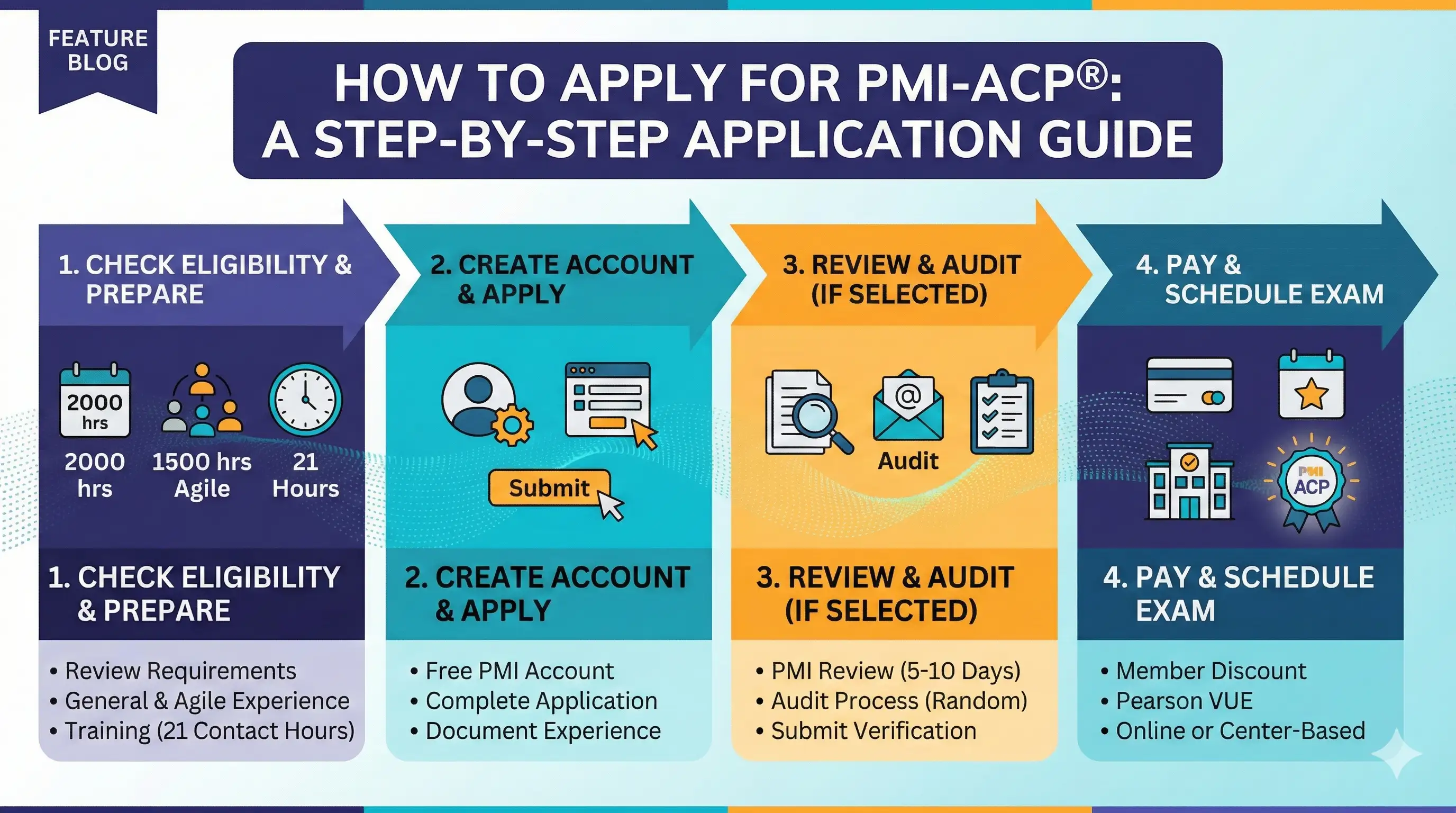
The PMI-ACP application requires more documentation than most agile certifications. You'll need to record two types of project experience separately, document your agile education, and potentially respond to an audit. Taking time to prepare before you start makes the process smoother.
This guide walks through every step from creating your PMI account to scheduling your exam date. For a complete overview of the certification, see our PMI-ACP Certification Guide.
Before You Begin: Application Checklist
Gather everything you need before starting the application. PMI gives you 90 days to complete it once started, but having materials ready prevents delays.
Confirm eligibility:
- 2,000 hours of general project experience (last 5 years)
- 1,500 hours of agile project experience (last 3 years)
- 21 contact hours of agile education
If you're unsure whether you qualify, review our detailed guide on PMI-ACP Requirements.
Gather experience documentation:
For each project you'll list, prepare:
- Project title and organization name
- Your role on the project
- Start and end dates
- Hours worked
- Brief description of your contributions
You'll need this for both general and agile experience sections—and they must be documented separately.
Gather education documentation:
For each course or training:
- Course title
- Training provider name
- Completion date
- Number of contact hours
- Certificate (keep accessible in case of audit)
Decide on PMI membership:
If you're not already a member, join before applying. You'll save $60 on the exam fee and gain access to the Agile Practice Guide. See our PMI-ACP Cost breakdown for the full financial picture.
Have payment ready:
You'll pay the exam fee at the end of the application process. PMI accepts major credit cards.
Step 1: Create or Access Your PMI Account
If you already have a PMI account from PMP, CAPM, or previous membership, log in with your existing credentials. All PMI certifications use the same account.
For new users:
- Go to PMI.org
- Click "Register" to create an account
- Complete your profile with accurate personal information
- Verify your email address
Join PMI (recommended):
If you haven't already, join as a PMI member before starting your application:
- Navigate to Membership
- Select the membership type (standard is $139/year + $10 first-time application fee)
- Complete payment
- Membership activates immediately
Your member discount applies automatically when you pay the exam fee later in the process.
Step 2: Start the PMI-ACP Application
Once logged in, navigate to the certification section:
- Go to Certifications → Apply Now
- Select PMI-ACP from the certification options
- Read and accept the terms and conditions
- Begin the application
Application timeline:
PMI gives you 90 days to complete your application once started. You can save your progress and return—you don't need to finish in one session. However, don't start until you have your documentation ready, as the 90-day clock begins immediately.
Step 3: Document General Project Experience
The first experience section captures your 2,000 hours of general project work. This doesn't need to be agile-specific—any project team experience within the last five years counts.
For each project, you'll enter:
- Project title
- Organization/company name
- Your job title during the project
- Functional reporting area
- Project start and end dates
- Hours worked on this project
- Project description and your role
Writing effective project descriptions:
Keep descriptions factual and specific. Focus on:
- What the project delivered
- Your specific responsibilities
- How you contributed to project outcomes
Avoid vague language like "assisted with various tasks" or "helped the team succeed." Instead: "Coordinated testing activities across three development teams, tracked defects, and reported status to project stakeholders."
PMP/PgMP holders:
If you already hold PMP or PgMP certification, indicate this in the application. Your general experience requirement is automatically satisfied—you can skip this section and proceed directly to agile experience documentation.
How many projects to list:
List enough projects to reach 2,000 hours total. This might be one large multi-year project or several smaller ones. Quality of descriptions matters more than quantity of projects.
Step 4: Document Agile Project Experience
This section captures your 1,500 hours of agile-specific experience. This is separate from general experience—you're documenting work on agile teams specifically.
For each agile project, you'll enter:
- Project title
- Organization/company name
- Your job title during the project
- Methodology used (Scrum, Kanban, XP, Lean, etc.)
- Project start and end dates
- Hours worked on this project
- Description of your agile role and contributions
Writing effective agile experience descriptions:
Make the agile nature of your work clear. Reference:
- The methodology or framework used
- Your role on the agile team
- Agile practices you participated in
- How the team delivered value incrementally
Example description:
"Served as team member on a Scrum team delivering customer-facing features for the mobile application. Participated in sprint planning, daily standups, sprint reviews, and retrospectives. Collaborated with Product Owner on backlog refinement and story acceptance criteria. Team delivered working software every two weeks using two-week sprints."
Common documentation mistakes to avoid:
- Describing traditional project work as agile without evidence of agile practices
- Using generic descriptions that could apply to any methodology
- Failing to mention specific agile events, artifacts, or practices
- Overlapping the same hours in both general and agile sections (they must be separate)
Methodology variety:
If you've worked with multiple agile approaches, include that variety. PMI-ACP covers Scrum, Kanban, Lean, XP, and more—demonstrating breadth strengthens your application.
Step 5: Document Agile Education
This section records your 21 contact hours of agile training. You can list multiple courses if needed to reach 21 hours total.
For each course, enter:
- Course title
- Training provider/institution
- Provider contact information
- Course start and end dates
- Number of contact hours
- Brief description of course content
What qualifies as contact hours:
- Instructor-led courses (in-person or virtual)
- Workshops and training programs
- Formal bootcamps
- Qualifying online courses with instructor interaction
Self-study through books or videos alone typically doesn't count. The "contact" in contact hours implies interaction with an instructor.
Combining multiple courses:
If your CSM course was 16 hours and you took a 5-hour Kanban workshop, you can list both to reach 21 hours. Keep certificates from all training—you'll need them if audited.
If you completed training years ago:
Training from previous years still counts as long as you have documentation. There's no recency requirement for education hours like there is for experience.
Step 6: Review and Pay
Before submitting, review your entire application:
- Verify all dates are accurate
- Check that experience hours total correctly
- Confirm education hours reach at least 21
- Review descriptions for clarity and completeness
Exam fee payment:
- PMI member: $435
- Non-member: $495
PMI accepts Visa, MasterCard, American Express, and Discover. Your payment is processed when you submit the application.
What you're agreeing to:
By submitting, you certify that all information is accurate and complete. You also agree to PMI's code of ethics and acknowledge that false information can result in certification revocation.
Step 7: After Submission
Once submitted, your application enters PMI's review queue.
Standard processing:
Most applications are reviewed within 5-10 business days. You'll receive email notification when a decision is made.
Possible outcomes:
Approved: You're cleared to schedule your exam. You have one year from approval to take the test.
Audit selected: Approximately 5-10% of applications are randomly selected for audit. This isn't a rejection—it's a verification process.
Returned for clarification: PMI may request additional information or clarification on specific entries. Respond promptly to avoid delays.
If You're Selected for Audit
An audit selection isn't cause for alarm if your application is accurate. PMI randomly audits applications to maintain certification integrity.
What you'll need to provide:
- Experience verification forms signed by supervisors or colleagues who can confirm your project work
- Copies of education certificates or transcripts
- Any additional documentation PMI requests
Audit timeline:
You have 90 days to submit audit materials. Once submitted, PMI typically reviews within 5-7 business days.
Preparing proactively:
Even before applying, maintain relationships with former supervisors and colleagues who could verify your experience. Keep copies of all training certificates organized and accessible.
If you can't complete the audit:
If you cannot provide required documentation, your application will be rejected. You can reapply when you can properly document your qualifications.
Scheduling Your Exam
Once approved, you'll schedule through Pearson VUE, PMI's testing partner.
How to schedule:
- Log into your PMI account
- Access your certification dashboard
- Click "Schedule Exam"
- You'll be redirected to Pearson VUE
- Choose test center or online proctoring
- Select your preferred date and time
- Confirm your appointment
Test center considerations:
- Availability varies by location
- Popular times book quickly—schedule early
- You can search for centers near your location or while traveling
Online proctoring considerations:
- More scheduling flexibility (evenings, weekends)
- Must meet technical and environment requirements
- Run the system check before your exam date
Rescheduling and cancellation:
- Reschedule or cancel up to 48 hours before your appointment without penalty
- Changes within 48 hours may incur fees
- No-shows forfeit the exam fee
One-year eligibility window:
From your approval date, you have one year to take the exam. Don't wait until the last minute—schedule with enough time to reschedule if something comes up.
Next Steps
With your application submitted, shift your focus to exam preparation. Use the time between application and exam date strategically.
For guidance on what to expect when you sit for the exam, see our PMI-ACP Exam Day Guide. If you haven't yet built your study plan, review our PMI-ACP Study Plan for week-by-week schedules.
Ready to prepare while you wait? Start practicing PMI-ACP questions covering all seven domains, or download the PM Drills app to study anywhere.