
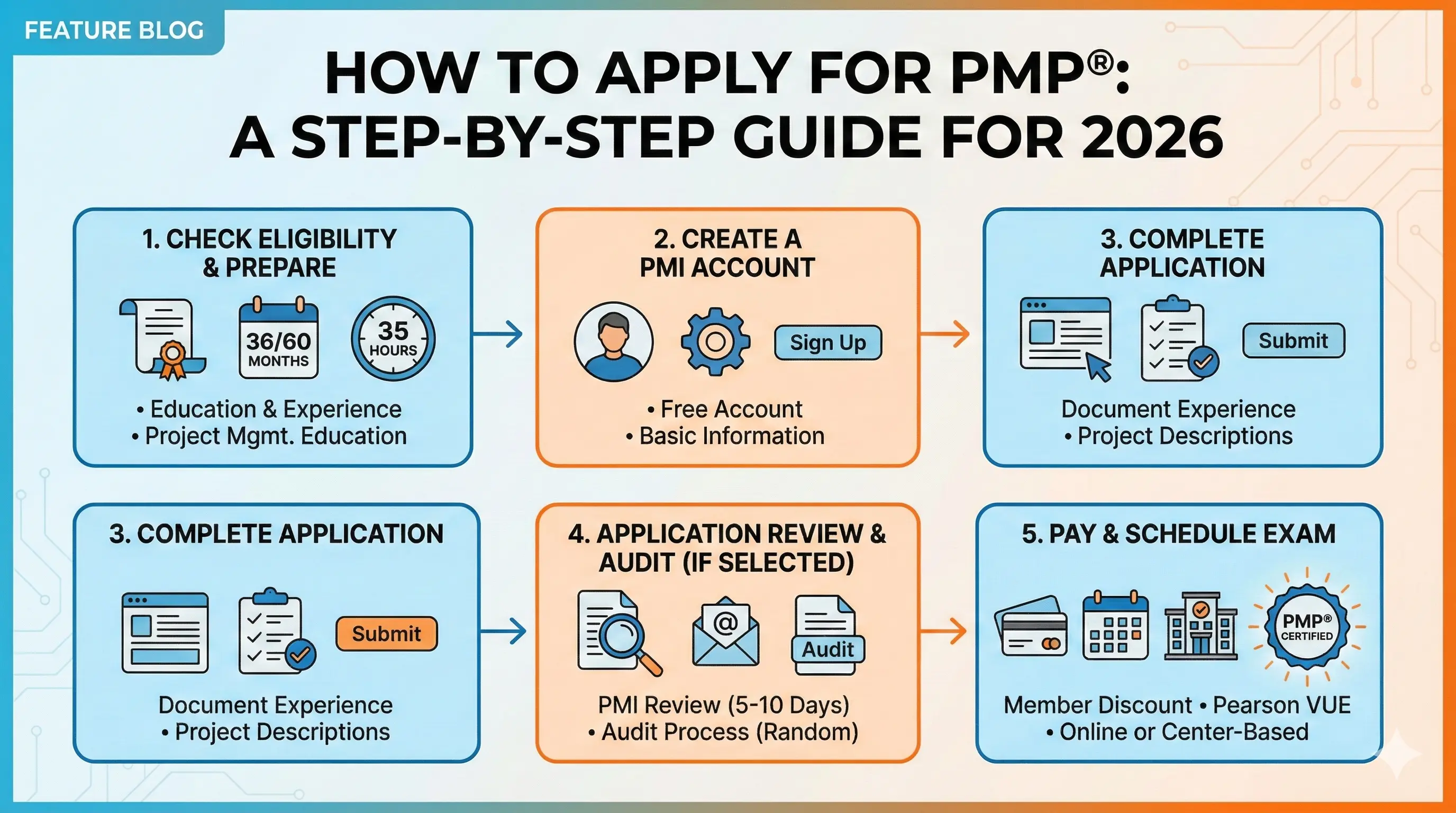
The PMP application is detailed and thorough—PMI wants to verify you genuinely meet the eligibility requirements before letting you sit for the exam. The good news is that the process is manageable if you prepare properly. Most candidates spend 1-2 weeks gathering documentation and completing their application.
This guide walks you through every step, from creating your PMI account to scheduling your exam. For a complete overview of the certification, see our PMP Certification Guide.
Before You Apply: Your Checklist
Don't start the application until you have everything ready. Gathering materials mid-application leads to frustration and delays.
Confirm your eligibility:
Review the PMP requirements and verify you qualify through one of the two pathways:
- Path 1: Bachelor's degree + 36 months leading projects + 35 hours PM education
- Path 2: High school/associate's + 60 months leading projects + 35 hours PM education
Gather your project documentation:
For each project you'll include, collect:
- Project title and brief description
- Your role and the organization
- Start and end dates
- Approximate hours spent
- Supervisor or verifier contact information
You'll need enough projects to meet your experience threshold (36 or 60 months). Having documentation ready before you start makes the application much smoother.
Complete your 35-hour education requirement:
This must be done before you apply. Have your certificates of completion ready with:
- Course titles
- Provider names
- Completion dates
- Contact hours earned
- Topics covered
Decide on PMI membership:
If you're not already a member, join PMI first. You'll save $150 on the exam fee—more than covering the $149 first-year membership cost.
Prepare your payment method:
Have a credit card ready. Payment is due when you submit the application. Current fees:
- PMI members: $405
- Non-members: $555
Allow adequate time:
Plan for 1-2 weeks to complete the application thoughtfully. You can save progress and return, but rushing through project descriptions often creates problems—either during review or if you're audited.
Step 1: Create Your PMI Account and Join
If you don't already have a PMI account, start here.
Creating your account:
- Go to PMI.org
- Click "Register" or "Join"
- Enter your personal information
- Create login credentials
- Verify your email address
Joining as a PMI member:
If you're joining PMI (recommended), complete the membership application during or immediately after account creation:
- Select individual membership
- Enter your professional information
- Pay the membership fee ($139 annual + $10 application fee)
- Confirmation arrives via email
Your member benefits activate immediately, including access to PMBOK Guide and Agile Practice Guide downloads—useful for your preparation.
Already have an account?
If you previously created a PMI account (for chapter events, webinars, or other reasons), simply log in. You don't need a new account.
Step 2: Start the PMP Application
With your account ready, navigate to the certification application.
Finding the application:
- Log into your PMI account
- Navigate to "Certifications" in the menu
- Select "Project Management Professional (PMP)"
- Click "Apply Now"
Application overview:
The application has several sections:
- Personal information
- Educational background
- Project management experience
- PM education (35 hours)
- Review and payment
You don't need to complete everything in one sitting. PMI's system saves your progress automatically, and you have 90 days to complete and submit your application.
Saving and resuming:
Work on the application when you have focused time—especially for project descriptions. You can save at any point, log out, and return later. Your work is preserved.
Step 3: Enter Your Education
The education section captures your academic background. This is straightforward for most candidates.
What to enter:
- Degree type (high school, associate's, bachelor's, master's, doctorate)
- Field of study
- Institution name
- Country
- Year completed
Multiple degrees:
If you have multiple degrees, enter your highest level of education. The application uses this to determine which experience pathway applies to you (36 months for bachelor's or higher, 60 months for secondary/associate's).
International education:
PMI accepts degrees from accredited institutions worldwide. Enter your credentials as they appear on your official documents. If there's any question about equivalency, you may need credential evaluation—but this typically only becomes relevant during an audit.
No documentation required at this stage:
You don't upload transcripts during the application. PMI only requests educational documentation if you're selected for audit after submission.
Step 4: Document Your Project Experience
This is the most time-consuming section—and the most important to get right. Your project descriptions must clearly demonstrate that you were leading and directing projects, not just participating.
What PMI asks for each project:
- Project title: A clear, descriptive name
- Organization: Company or entity where you performed the work
- Your job title: Your role during this project
- Functional reporting area: Department or division
- Organization primary focus: Industry sector
- Project start and end dates: Month and year
- Hours spent on the project: Total hours across the project duration
- Project description: Detailed narrative of your responsibilities
Mapping to process groups:
For each project, you'll allocate your hours across PMI's five process groups:
- Initiating: Defining the project, getting authorization
- Planning: Developing plans for scope, schedule, budget, etc.
- Executing: Directing work and managing the team
- Monitoring and Controlling: Tracking progress, managing changes
- Closing: Finalizing deliverables, documenting lessons learned
Your hours don't need to be evenly distributed. A project manager typically spends more time in Executing and Monitoring/Controlling than in Initiating and Closing. Estimate realistically based on your actual involvement.
Writing effective project descriptions:
Your descriptions need to demonstrate leadership, not just participation. PMI reviewers (and auditors) look for evidence that you were directing the work.
Weak description:"Worked on a software implementation project. Attended meetings and helped the team complete deliverables on time."
Strong description:"Led the implementation of a new ERP system for a 200-person manufacturing division. Directed a cross-functional team of 12 including IT, finance, and operations staff. Developed the project charter and secured executive sponsorship. Created and managed the project schedule and $450K budget. Facilitated weekly stakeholder meetings and managed a formal change control process. Coordinated vendor relationships and procurement activities. Delivered the project on time and 5% under budget."
Key differences:
The strong description uses active leadership language ("led," "directed," "developed," "managed") and demonstrates responsibility for project outcomes, not just task completion.
Tips for strong project descriptions:
- Start sentences with action verbs: led, managed, directed, coordinated, developed, controlled
- Include scope indicators: team size, budget, timeline, organizational impact
- Reference PM activities: stakeholder management, risk identification, change control, schedule management
- Show accountability for outcomes, not just activities
- Use PMI terminology naturally where appropriate
How many projects to include:
Include enough projects to meet your experience threshold with some buffer:
- Path 1: At least 36 months (consider documenting 40-45 months)
- Path 2: At least 60 months (consider documenting 65-70 months)
Having buffer protects you if PMI questions any entries or if an auditor determines some experience doesn't qualify.
Overlapping projects:
If you managed multiple projects simultaneously, you can include them all—but overlapping months only count once toward your total. Leading two projects in January still equals one month of experience, not two.
Contact information for verification:
For each project, you'll provide a supervisor or verifier who can confirm your role if you're audited. Include:
- Name
- Title
- Organization
- Email and phone
Choose verifiers who can actually speak to your project leadership. This doesn't have to be your direct manager—it could be a project sponsor, client, or other stakeholder who observed your work.
If verifiers are unavailable:
If a supervisor has retired, passed away, or is otherwise unreachable, note this in your records. PMI may accept alternative verification methods in these cases, but you'll need to explain the situation if audited.
Step 5: Document Your PM Education Hours
The 35-hour requirement is non-negotiable. Document every course you're claiming toward this threshold.
What to enter for each course:
- Course title
- Provider name (training company, university, employer, etc.)
- Completion date
- Contact hours earned
- Provider contact information
- Topics covered
Multiple courses are fine:
You don't need all 35 hours from a single source. Many candidates combine:
- A primary prep course (25-30 hours)
- Supplementary workshops or webinars (5-10 hours)
- Employer-provided training (variable)
Just ensure each course legitimately covers project management topics and that you have documentation to prove completion.
Contact hours vs. PDUs:
These are different things. Contact hours are for initial certification eligibility. PDUs (Professional Development Units) are for maintaining your certification after you pass. Don't confuse them—enter contact hours in this section.
Keep your certificates:
You'll need to produce certificates of completion if audited. Store them securely and ensure they clearly show:
- Your name
- Course title
- Provider
- Completion date
- Hours earned
Step 6: Review, Pay, and Submit
Before submitting, review everything carefully. Errors or inconsistencies can trigger additional review or audit selection.
Final review checklist:
- Personal information accurate and matches your ID
- Education details correct
- All projects clearly demonstrate leadership
- Project dates and hours are realistic and accurate
- PM education hours total at least 35
- Contact information for verifiers is current
Payment:
Submit payment by credit card. The fee is charged immediately:
- PMI members: $405
- Non-members: $555
Keep your payment confirmation for your records.
Submission confirmation:
You'll receive an email confirming your application was submitted. This starts the PMI review process.
After Submission: What Happens Next
Your application enters PMI's review queue. Here's what to expect.
Application review timeline:
PMI typically reviews applications within 5-10 business days. During busy periods, it may take longer. You'll receive email notification when review is complete.
Possible outcomes:
- Approved: You're eligible to schedule your exam. Proceed to the next section.
- Selected for audit: Approximately 10-15% of applications are randomly selected. This doesn't indicate suspicion—it's a quality control process. See below for audit details.
- Additional information requested: PMI may ask for clarification on specific projects or education entries. Respond promptly and thoroughly.
If you're audited:
Don't panic. The audit process verifies what you submitted:
Documentation required:
- Educational transcripts or diploma copies
- PM education certificates (all courses claimed)
- Verification signatures from project supervisors
Timeline:You have 90 days to submit audit materials. Most candidates complete this in 2-4 weeks.
Process:
- Download the audit packet from your PMI account
- Gather required documentation
- Obtain supervisor signatures on verification forms
- Submit materials online and/or by mail
- Wait for audit review (typically 5-7 business days)
Outcome:If you pass the audit, you proceed to scheduling. If you fail, your payment is refunded, but you'll need to address the issues before reapplying.
Preparing proactively:
Even if you're not audited, have materials ready as if you will be:
- Education certificates accessible
- Supervisor contact information current
- Project details fresh in your mind
Scheduling Your Exam
Once approved, you have one year to pass the PMP exam. Don't let this window close without attempting.
Scheduling through Pearson VUE:
- Receive eligibility notification from PMI
- Log into your PMI account
- Click the scheduling link to access Pearson VUE
- Choose test center or online proctoring
- Select your preferred date and time
- Confirm your appointment
Test center considerations:
- Choose a convenient location (less stress on exam day)
- Morning vs. afternoon based on when you're sharpest
- Allow travel time and parking considerations
- Weekday vs. weekend availability varies by location
Online proctoring considerations:
- Ensure you have a private, quiet space
- Test your system using Pearson's compatibility check
- Have backup plans for technical issues
- Understand the workspace requirements (clear desk, no dual monitors)
When to schedule:
Schedule when you're ready—not before. Rushing to the exam unprepared wastes your attempt and $405+ in retake fees.
Most candidates schedule 1-2 weeks after reaching consistent passing scores on mock exams. This maintains momentum while allowing time for final review.
Rescheduling policies:
Life happens. Pearson VUE allows rescheduling:
- Free rescheduling with 24+ hours notice (policies may vary)
- Fees apply for late changes or no-shows
- Check current policies when scheduling
Next Steps After Application
While waiting for approval—and especially after you're cleared to schedule—focus on preparation.
Understand what you'll face on test day with our PMP Exam Day guide. If you haven't already, review the PMP Exam Format to understand question types and timing.
Ready to start serious practice? Build exam confidence with PM Drills and track your readiness across all three domains.